Sunday, May 31, 2015

Changing the mouse wheel behavior for Kodi/XBMC

Kodi (A.K.A. XBMC) is a wonderful media center software that can do pretty much everything about the home entertainment and more.   I am using a wireless mouse to control a laptop connected to TV.  One annoying thing is that the mouse wheel is linked to forward/backward in the video playback.  This leads to some sudden jumps in playback when I accidentally hit the mouse (wheel).   Meanwhile, there is no mouse action that can controls the volume up/down easily.  I have to either uses the keybaord (i.e. stand up and step forward) or use the TV/receiver control (i.e. fumble around).  It finally get to the point that I have to find a solution.  After some search and experiments, particularly thanks to the excellent explanation on the wiki (http://kodi.wiki/view/keymap) I was able to change the mouse wheel to control volume.  Here is what I did:

<?xml version="1.0" encoding="UTF-8"?>
<keymap>
   <fullscreenvideo>
 <mouse>
  <wheelup>VolumeUp</wheelup>
  <wheeldown>VolumeDown</wheeldown>
 </mouse>
  </fullscreenvideo>
  
  <!--Change the video control -->
   <videoosd>
 <mouse>
  <wheelup>VolumeUp</wheelup>
  <wheeldown>VolumeDown</wheeldown>
 </mouse>
  </videoosd>
</keymap>

There are several posts talking about the <fullscreenvideo> window (http://kodi.wiki/view/keymap#Windows), which controls the behavior when there is no menu.  But often any movement of the mouse first activates the <videoosd> window, and we have to change the wheelup/down in that window as well. Otherwise, you still get forward/backward bahavior.  Hopefully this can help you as well.

Saturday, April 18, 2015

A Talk about Financial Engineering and MBS

I was giving a quick talk about the Financial Engineering and MBS.  Here is the link.  Hopefully you might find it intereseting.


link to the slide

Wednesday, July 16, 2014

Don't return in a closure for each() in Groovy

I am a Java coder.  All these years I heard so many buzz about functional language, but I never took the dive.  Well, I got some tastes recently. 

We recently switched to use Gradle to manage the project.  I was banning my head for a couple hours yesterday for an odd problem.


boolean isStartedWithList(String str){
  def list=['pre','post']
  list.each {
    if (str.startsWith(it)){
       println 'hit true'
       return true
    }
   }
  println 'hit default false'
  return false
  }  
If you run isStartedWithList('prehistorical'), you will see
hit true
hit default false
The returned value is false. This is because the (first and the second) return only gets you out of the closure, not the method. There are two ways to fix it: to switch back to the traditional for loop, or not to rely on the early exit from the return call.
boolean isStartedWithList(String str){
  def list=['pre','post']
  for (it:list) {
    if (str.startsWith(it)){
       println 'hit true'
       return true
    }
  println 'hit false'
  return false
  }  
boolean isStartedWithList(String str){
  def list=['pre','post']
  result=false;
  list.each {
    result=result||str.startsWtih(it)
   }
  return result
  }  
Both will get you the expected answer. Lessons are learned!

Edit 7/18/2014:

I just learned a even better one using the groovy collection method any
boolean isStartedWithList(String str){
  return ['pre','post'].any{str.startsWith(it)}
}

Sunday, June 3, 2012

A combiner works in a reducer as well as a mapper

In Hadoop, a combiner is usually introduced as a way to collapse the output record of maps in the end of a map task and therefore reduce the network traffic and alleviate the load of reducers. A less known function of a combiner that I recently discovered is that  it also works in the reduce phase. (CDH3u3, 0.20.2).  A reducer task, more specifically, its shuffle functions,  usually kicks off before all maps finish.  Once it collects enough records from all maps tasks (controlled by "mapred.inmem.merge.threshold" property) through network, records will be merged and a combiner will be called upon those records if one is specified in the job conf.  This is a very useful feature in the case where there are too many map tasks for the system to start them simultaneously.  Map outputs are collapsed by the combiner in the reducer task during the time, and final reduce run will not need to work no more records than "mapred.inmem.merge.threshold".  Many commercial or third-part versions of Hadoop actually specifically advertise some function similar as "proactive execution" or so.  It is great to know that the plain vanilla Hadoop already has something like this.

Saturday, November 12, 2011

Using a csv file as a metadata database in Greenstone (2.84)

Alternative to entering metadate manually in GLI in Greenstone (currently 2.84).  One can create a csv file with all the metadatas and import it into greenstone using gli.  This is very useful for at least two cases: 
  1. You can get the metadata from somewhere else in csv format.
  2. You want to experiment on a collection.  And you manage metadata in a separate csv file and  do not need to reenter all the metadatas after you screw up the collection. 

Greenstone has a metadatacsv plugin and unfortunately the author cannot figure out how to use it.  Alternatively, Greenstone has a explode metadata mechanism which is very useful.   Let us detail it. 

Let us first assume we have three files in Greenstone:

a.txt, b.txt, c.html


Filename,dc.Title,dc.Creator,Description,Contributor
a.txt, a, GZ, first test, GJZ
b.txt, b, GZ, second test, GJZ
c.html, c, GZ, third one, GJZ

A couple of point to notice for this file:
  • The first line is the label
  • The name of the label must exactly match the your metadata name (including the case, title will be mapped into "dc.title", instead of the standard "dc.Title")
  • Later we will choose the default metadata set, the non-qualified label will be mapped into this default set (Dublin Core in this case)
  • One can use a simple text editor do it. 
  • Google Doc is also an excellent tool with the  built-in collaborating function. One can create a spreadsheet first, fill it with your team mates, then "download as" a csv file. 

Here is the procedure in GLI
  1. (optional) create a new collection
  2. In the "Gather" tab, add all three files (a.txt, b.txt, c.html)
  3. In the "Gather" tab, add meta.csv (a window will pops up asking about plugin to use, choose either one and this does not matter much)
  4. In the "Enrich" tab, right-click "meta.csv", choose "explode metadata database", a new window will pop up (it shows as CSVPlugin, it is fine)
  5. choose "metadata_set" accordingly (Dublin Core in the example), this will be your default set, all your non-qualified metadata will be mapped into this (in our example, "Description" is mapped as "dc.Description")
  6. tick "document_field", enter the label of the file name column ("Filename" in the example)
  7. click "explode"
  8. In the Enrich tab, you will notice that all three files becomes the sub-levels of meta. And the metadata field is populated.  You can enter more
  9. Build the collection, tweak the display, do the rest 


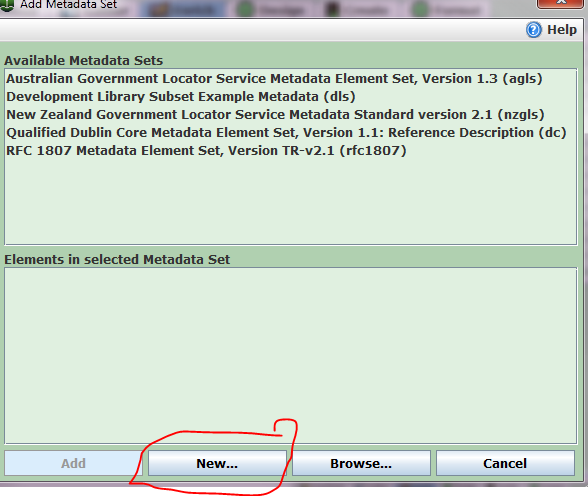
Adding metadata with a new metadata scheme


Sometimes one has some special metadata fields that do not fit any existing schema.  One might want to create a new one from scratch or by modifying the existing one.  This can be done in Greenstone GEMS. Or one can do the same in  GLI "Manage Metadatasets..." in "Enrich" tab. 


I made a new metadata set "my new DC" from Dublin Core.  So it has no complication of the sublevel, all flat.  I specify it with a new "namespace"  ---"mdc" in order to distinguish it from normal dc.  I then use the same procedure as in the coruse website to explode a csv metadata file and it work fine. 


Subtlety with line end in CSV

Sometimes it just gives you a 000001.nul when you explode the csv file. It seems that CSVplugin of greenstone (@2.84) only works well with unix time line end "LR", but not well with Windows type "CR LR". Unfortunately, Excel generates wrong style. One way around is to copy the full sheet from excel to google doc spreadsheet and then "download as" CSV. Google doc seems to produce the CSV Greenstone likes. This csv file should explode fine. Greenstone team needs to work on the CSVplugin.

Thursday, November 10, 2011

Adding Media Player into Greenstone with jPlayer


"jPlayer" is a very nice javascript libraryto play various types of media files in browser using html 5 or flash. It can be integrated into the digital library software Greenstone (2.84) to enable it play various digital files. In this example, we enable the following types:
audio: mp3, m4a, oga
video: mp4(m4v), webmv, ogv, flv
(note: These are not all playable in every browsers due to the inconsistent media-type support across them.)

Let us assume the collection folder is {mycollection}="{greenstone folder}/collect/mycollection"

This example uses jPlayer 2.1.0, Greenstone 2.84.


  1.  Download jPlayer files and expand them into the "{mycollection}/script" folder
    ./add-on/jplayer.playlist.min.js
    ./add-on/jquery.jplayer.inspector.js
    ./Jplayer.swf
    ./jquery.jplayer.min.js
    
  2. Download one of the jPlayer skins (Blue Monday : Pink Flag) and expand all files except the *.psd file into the "{mycollection}/style" folder
    jplayer.pink.flag.css
    jplayer.pink.flag.jpg
    jplayer.pink.flag.seeking.gif
    jplayer.pink.flag.video.play.png
    
  3. Put a new player button image into "{mycollection}/images" folder.  I use this link. A small size one (48px or even 16px) is enough. One can even skip this step, if a "player" button or pure text is preferred.
  4. Create a new javascript file (playMedia.js) with the following text and put it into "{myCollection}/script" folder
    function playMedia(playerId,inspectorId,fullcontainerId,containerId,base,type,src){
    
     $("#"+fullcontainerId).show();
     $("#"+playerId).jPlayer("destroy");
          $("#"+playerId).jPlayer({
            ready: function () {
              $(this).jPlayer("pauseOthers").jPlayer("setMedia",media(type,base+"/"+src)).jPlayer("play");
            },
            errorAlerts:false,
            warnAlerts:false,
            swfPath: base+"/script/",
            supplied: type,
            cssSelectorAncestor: "#"+containerId,
            solution:"html,flash",
            ended:function(){
                
             $("#"+fullcontainerId).hide();
            }
          });
          $("#"+inspectorId).jPlayerInspector({jPlayer:$("#"+playerId)});
    }
    
    function media(type,src){
    
    switch (type.toLowerCase()){
    case "mp3":return {mp3:src}; break;
    case "oga":return {oga:src}; break;
    case "ogv":return {ogv:src}; break;
    case "m4a":return {m4a:src}; break;
    case "webmv":return {webmv:src}; break;
    case "m4v":return {m4v:src}; break;
    case "ogv":return {ogv:src}; break;
    case "flv":return {flv:src}; break;
    default:
    }
    }
    
    
  5. Start GLI of greenstone, open collection, paste the following into the "Collection Specific Macros" in "Format" tab. Alternatively, one can create a file "extra.dm" in "{myCollection}/macros" folder
    
    
    # extra.dm file
    # You can add collection specific macros in here
    # Lines starting with a '#' are comments.
    # Remember to include the package declaration
    
    package Style
    
    # will be applied to all pages 
    # add css style lines inside the style tags
    _collectionspecificstyle_ {
    <style type="text/css">
    div.jp-audio,
    div.jp-video {
      /* Edit the font-size to counteract inherited font sizing.
       * Eg. 1.25em = 1 / 0.8em
       */
      font-size:1.25em;
    \}
    </style>
    }
    
    # add any javascript functions here
    _collectionspecificscript_ { 
    $(document).ready(function(){
          $("#jquery-jplayer-1").jPlayer({
            ready: function () {
              
            \},
            errorAlerts:false,
            swfPath: "_httpcollection_/script/",
            supplied: "mp3,oga,m4a",
            cssSelectorAncestor: '#jp-container-1',
            solution:"html,flash",
            ended:function(){
            $("#jplayer-div").hide();
            \}
          \});
        $("#jplayer-inspector").jPlayerInspector({jPlayer:$("#jquery-jplayer-1")\});
    
    
    $("#jquery-jplayer-video").jPlayer({
            ready: function () {
             
            \},
            errorAlerts:false,
            swfPath: "_httpcollection_/script/",
            supplied: "webmv,ogv,m4v",
            cssSelectorAncestor: '#jp-container-video',
            solution:"html,flash",
            ended:function(){
            $("#jplayer-div-video").hide();
            \}
          \});
        $("#jplayer-inspector-video").jPlayerInspector({jPlayer:$("#jquery-jplayer-video")\});
    
        \});
    
    function play(type,src){
    type=type.toLowerCase();
    switch (type.toLowerCase()){
    case "mp3":
    case "oga":
    case "m4a":$('#jplayer-div-video').hide();
       playMedia("jquery-jplayer-1","jplayer-inspector","jplayer-div","jp-container-1","_httpcollection_",type,src);
       break;
    case "webmv":
    case "m4v":
    case "flv":
    case "ogv":$('#jplayer-div').hide();
       playMedia("jquery-jplayer-video","jplayer-inspector-video","jplayer-div-video","jp-container-video","_httpcollection_",type,src);
       break;
    default:
    \}
    \}
    
    }
    
    
    _pagescriptfileextra_{
    <link href="_httpcollection_/style/jplayer.pink.flag.css" rel="stylesheet" type="text/css" />
    <script type="text/javascript" src="http://ajax.googleapis.com/ajax/libs/jquery/1.6/jquery.min.js"></script>
    <script type="text/javascript" src="_httpcollection_/script/jquery.jplayer.min.js"></script>
    <script type="text/javascript" src="_httpcollection_/script/add-on/jquery.jplayer.inspector.js"></script>
    <script type="text/javascript" src="_httpcollection_/script/playMedia.js"></script>
    
    }


    _document:footer_ {
     _jplayer_
    </div> <!-- document:footer -->
    
    <div class="navarrowsbottom">
    _navarrowsbottom_
    </div>
    _endspacer__htmlfooter_
    }
    
    _jplayer_{
    
      <div id="jplayer-div" style="display:none;">
      <div id="jp-container-1" class="jp-audio" ">
    <div id="jquery-jplayer-1" class="jp-jplayer"></div>
      
    <div class="jp-type-single">
          <div class="jp-gui jp-interface">
            <ul class="jp-controls">
              <li><a href="javascript:;" class="jp-play" tabindex="1">play</a></li>
              <li><a href="javascript:;" class="jp-pause" tabindex="1">pause</a></li>
              <li><a href="javascript:;" class="jp-stop" tabindex="1">stop</a></li>
              <li><a href="javascript:;" class="jp-mute" tabindex="1" title="mute">mute</a></li>
              <li><a href="javascript:;" class="jp-unmute" tabindex="1" title="unmute">unmute</a></li>
              <li><a href="javascript:;" class="jp-volume-max" tabindex="1" title="max volume">max volume</a></li>
            </ul>
            <div class="jp-progress">
              <div class="jp-seek-bar">
                <div class="jp-play-bar"></div>
              </div>
            </div>
            <div class="jp-volume-bar">
              <div class="jp-volume-bar-value"></div>
            </div>
            <div class="jp-time-holder">
              <div class="jp-current-time"></div>
              <div class="jp-duration"></div>
              <ul class="jp-toggles">
                <li><a href="javascript:;" class="jp-repeat" tabindex="1" title="repeat">repeat</a></li>
                <li><a href="javascript:;" class="jp-repeat-off" tabindex="1" title="repeat off">repeat off</a></li>
              </ul>
            </div>
          </div>
          
          <div class="jp-no-solution">
            <span>Update Required</span>
            To play the media you will need to either update your browser to a recent version or update your <a href="http://get.adobe.com/flashplayer/" target="\_blank">Flash plugin</a>.
          </div>
        </div>
     
      </div>
      <div id="jplayer-inspector"></div>
    </div>
    
    <div id="jplayer-div-video" style="display:none;">
    <div id="jp-container-video" class="jp-video ">
        <div class="jp-type-single">
          <div id="jquery-jplayer-video" class="jp-jplayer"></div>
          <div class="jp-gui">
            <div class="jp-video-play">
              <a href="javascript:;" class="jp-video-play-icon" tabindex="1">play</a>
            </div>
            <div class="jp-interface">
              <div class="jp-progress">
                <div class="jp-seek-bar">
                  <div class="jp-play-bar"></div>
                </div>
              </div>
              <div class="jp-current-time"></div>
              <div class="jp-duration"></div>
              <div class="jp-controls-holder">
                <ul class="jp-controls">
                  <li><a href="javascript:;" class="jp-play" tabindex="1">play</a></li>
                  <li><a href="javascript:;" class="jp-pause" tabindex="1">pause</a></li>
                  <li><a href="javascript:;" class="jp-stop" tabindex="1">stop</a></li>
                  <li><a href="javascript:;" class="jp-mute" tabindex="1" title="mute">mute</a></li>
                  <li><a href="javascript:;" class="jp-unmute" tabindex="1" title="unmute">unmute</a></li>
                  <li><a href="javascript:;" class="jp-volume-max" tabindex="1" title="max volume">max volume</a></li>
                </ul>
                <div class="jp-volume-bar">
                  <div class="jp-volume-bar-value"></div>
                </div>
                <ul class="jp-toggles">
                  <li><a href="javascript:;" class="jp-full-screen" tabindex="1" title="full screen">full screen</a></li>
                  <li><a href="javascript:;" class="jp-restore-screen" tabindex="1" title="restore screen">restore screen</a></li>
                  <li><a href="javascript:;" class="jp-repeat" tabindex="1" title="repeat">repeat</a></li>
                  <li><a href="javascript:;" class="jp-repeat-off" tabindex="1" title="repeat off">repeat off</a></li>
                </ul>
              </div>
              
            </div>
          </div>
          <div class="jp-no-solution">
            <span>Update Required</span>
            To play the media you will need to either update your browser to a recent version or update your <a href="http://get.adobe.com/flashplayer/" target="\_blank">Flash plugin</a>.
          </div>
        </div>
        
      </div>
      <div id="jplayer-inspector-video"></div>
      </div>
    }


    A few notes for macro
    • "}" and "_" have to be escaped as "\_", "\}"
    • Two jPlayer instances and containers are created. One for audio and one for video.
    • A new macro "_jplayer_" is created.
    • One javascript function "play(type,scr)" is created. It plays media files (scr) with jPlayer.
  6. Import media files into Greenstone.  We need to preserve the file format of the media file to call the play(type,scr) function.  Therefore, we need to either extract file format automatically or enter the metadata manually.  "MP3 plugin" can handle mp3 file and create "ex.fileformat" metadata automatically.
     To extract other format automatically, a simple way is to config a new "UnknownPlugin", tick the "file_format" and enter the desired format for play function. Tick the "process_extension" and enter the real file extension (e.g. ogv) . Alternatively, tick "process_exp" and enter the regular express for the filename.  (e.g. m4v)  
    Process_extension File Format
    mp4(video)m4v
    mp4(audio)m4a
    m4vm4v
    m4am4a
    ogg(video)ogv
    ogg(audio)oga
    ogaoga
    ogvogv
    flvflv
    webmwebmv

    One can add some new process_extension if unconventional extensions are used. Due to the above limitation, for "*.mp4" or "*.ogg", one can use either all as video or audio. A mixture does not work.

Monday, August 1, 2011

A very bizarre behavior (bug) of "mv" command

I spend all the afternoon to find this bizarre behavior (bug) of "mv" command.

Let us say we have a directory of "source" with files "a" and "b", and we want to move it to "dest/sub/". So the final should look like "dest/sub/source/...". The command should be simple enough "mv source dest/sub".

Well, this works fine when "dest/sub" exists. When we only have "dest", a sub directory "sub" is automatically created, however, files ("a" and "b") are directly copied over instead of the directory "source".

It is like this in Linux (CentOS5.4) "GNU bash, version 3.2.25(1)-release (x86_64-redhat-linux-gnu)", as well as Mac OS 10.6 "GNU bash, version 3.2.48(1)-release (x86_64-apple-darwin10.0)".

Monday, December 13, 2010

OpenID + Spring MVC 3 + Spring Security 3 + OpenID Selector

We decided to move our authentication into openID. Meanwhile, we upgrade our security from Spring Security 2 to 3. Adding OpenID to spring security is straightforward, add the following tag into "<http>" tag of security.xml
<openid-login login-page="/login.jsp" login-processing-url="/openlogin" user-service-ref="userDao"
                 authentication-failure-handler-ref="openIdAuthFailureHandler"/>

And OpenID will take over the authentication.

However, there are more to change for openID.

First and most obviously, we need a new login page takes user to openid provider instead of our own user/password checker. We chose openid-selector (1.2 currently) as the spring security choose it for demo. It is a fairly nice package. It allows one to choose from several openid providers (Google, Yahoo, AOL, OpenID, blogger, flicker, ...) Several things need to be done to use it:


  • However, it uses jQuery and has lots of conflict with prototype we are using. Fortunately, the conflict originates mostly from "$". I modify the two js file, replace all "$" with "jQuery" and add jQuery.noConflict(); in the beginning and firebug stops to complain.


  • There are several options in openid-jquery.js to play with. I use default mostly, except "no_sprite" to true as I have uncomment flickr and its not in the big sprite picture.


  • In the login page, add following into "<head"> tag (notice that openid-jquery.js should be add before openid-jquery-en.js)
    <script type="text/javascript" src="<c:url value="/scripts/jquery/openid-selector/js/openid-jquery.js" />"></script>
         <script type="text/javascript" src="<c:url value="/scripts/jquery/openid-selector/js/openid-jquery-en.js" />"></script>

    and add following into "<body">
    <script type="text/javascript">
            jQuery.noConflict();
            jQuery(document).ready(function(){
                openid.img_path="<c:url value='/scripts/jquery/openid-selector/images/'/>";
                openid.init("openid_identifier");
                jQuery("#openid_identifier").focus();
            });
        </script>

    Notice the openid.img_path has to be set outside if the openid-selector files are not put under the root.

These pretty much take care of login. But now we also need to modify signup process. Originally, you click signup and then put a new username/password. Now with openid, you first login with an openid from one of the providers, system found that you are not a user, and provide you a signup sheet. That is why in above <openid-login"> tag, we need a special "openIdAuthFailureHandler" for "authentication-failure-handler".

We can extend a spring handler for this purpose.
/*
 * To change this template, choose Tools | Templates
 * and open the template in the editor.
 */
package org.imirsel.nema.webapp.security;

import java.io.IOException;
import javax.servlet.ServletException;
import javax.servlet.http.HttpServletRequest;
import javax.servlet.http.HttpServletResponse;
import org.apache.commons.logging.Log;
import org.apache.commons.logging.LogFactory;
import org.springframework.security.core.AuthenticationException;
import org.springframework.security.core.userdetails.UsernameNotFoundException;
import org.springframework.security.openid.OpenIDAuthenticationStatus;
import org.springframework.security.openid.OpenIDAuthenticationToken;
import org.springframework.security.web.DefaultRedirectStrategy;
import org.springframework.security.web.authentication.AuthenticationFailureHandler;
import org.springframework.security.web.authentication.SimpleUrlAuthenticationFailureHandler;

/**
 *  Customized {@link AuthenticationFailureHandler} that redirect to sign-up page
 * if the OpenID authentication succeeds, but the user name is not yet in local DB of the container
 * @author gzhu1
 */
public class OpenIDAuthenticationFailureHandler extends SimpleUrlAuthenticationFailureHandler {

    static private Log logger = LogFactory.getLog(OpenIDAuthenticationFailureHandler.class);

    @Override
    public void onAuthenticationFailure(HttpServletRequest request,
            HttpServletResponse response, AuthenticationException exception)
            throws IOException, ServletException {
        logger.error(exception, exception);
        if (exception instanceof UsernameNotFoundException
                && exception.getAuthentication() instanceof OpenIDAuthenticationToken
                && ((OpenIDAuthenticationToken) exception.getAuthentication()).getStatus().equals(OpenIDAuthenticationStatus.SUCCESS)) {
            DefaultRedirectStrategy redirectStrategy = new DefaultRedirectStrategy();
            request.getSession(true).setAttribute("USER_OPENID_CREDENTIAL", exception.getAuthentication().getPrincipal());
            // redirect to create account page

            logger.info("user (" + exception.getAuthentication().getPrincipal() + "," + exception.getExtraInformation() + ") is not found and redirect to signup.");
            redirectStrategy.sendRedirect(request, response, "/signup.html");

        } else {
            super.onAuthenticationFailure(request, response, exception);
        }
    }
}

and declare the bean in applicationContext.xml.
<bean id="openIdAuthFailureHandler" class="org.imirsel.nema.webapp.security.OpenIDAuthenticationFailureHandler">
        <property name="defaultFailureUrl" value="/login.jsp"/>
    </bean>

Of course, now I do not really have a password, so I generate a random string for password, because a password is needed somewhere else.

That is it. Now your user can sign-in with their Google, Yahoo, AOL, open-id account directly.

Tuesday, December 7, 2010

My Review of HP G62-340US 15.6" Laptop

Originally submitted at Staples

Now you can do more and have more fun without spending more. The HP G62 notebook PC features the latest technology and enhanced security right out of the box for the perfect balance of performance, connectivity, and worry-free computing. With its cl ean design and textured HP Imprint finish in char...


Solid buy

By zggame from urbana, IL on 12/7/2010


5out of 5

Pros: Quiet, Quality Display

Best Uses: Web Browsing, Video, Word Processing

Describe Yourself: Tech Savvy

Primary use: Personal

I bought at the sale for $379-$50 coupon for my parents. It has HDMI and webcam. They mostly just use skype, web browsing and watch online streaming TV/movie. It is perfect for their usage. The thrown in office starter is not bad. HDMI is easy for them to connect TV to watch video, better than VGA+audio port. Webcam works fairly well during skype. Overall, it is plenty for them. Great buy. Not too many bloatware. Norton is annoying for the trial. I uninstalled it and put a free Avast Personal. Office starter should be more than enough for some basic use.

(legalese)

Wednesday, October 13, 2010

Set optional jetty-env.xml for JNDI in maven jetty plugins

I talked about how to set up jndi with jetty in last post. But I still like to use "jetty:run" in the maven jetty plugin. It uses an embed server that hard to configure. Later I found a way to specify a non-conventional position for jetty-env.xml in maven-jetty-plugin. So I put jetty-env.xml in that position and specify it in pom.xml. Now I can still use jetty:run. But when it packaged as war and deployed in web container. It cannot run without setting JNDI in server.

Here is my setting:
1. Put jetty-env.xml in WEB-INF/local/jetty-env.xml;
2. Add following into pom.xml

<plugin>
<groupId>org.mortbay.jetty</groupId>
<artifactId>maven-jetty-plugin</artifactId>
<version>6.1.22</version>
<configuration>

<contextPath>/</contextPath>

<jettyEnvXml>src/main/webapp/WEB-INF/local/jetty-env.xml</jettyEnvXml>
.......
</configuration>
</plugin>


Well, if you really hate any settings in svn repository. You can put jetty-env.xml somewhere outside svn directory. Use

<jettyEnvXml>${jetty.setting}</jettyEnvXml>

Now when you start maven append the system property jetty.setting=directory.

mvn -Djetty.setting=**/jetty-env.xml jetty:run

Friday, October 8, 2010

Use JNDI with Spring/Jetty

We used to bury the settings (databases, remote calls urls, ...) in Maven's setting.xml. We keep several profiles for settings for different servers and use maven's profile selector to switch between them. This approach hide the sensitive information (username/password to databses...) in our local machines and switch between different profiles fairly effectively. However, it is painful to keep settings.xml sync between us, especially when we changes setting in server pretty frequently. So we decide to move to JNDI, so the setting goes with the servlet server (Jetty now, maybe some more powerful stuff later) and no more sync problem.

It took me three full days! Unfortunately, it becomes another typical experience with the Configuration Nightmare. One spends hours after hours read stuff all over internet and nothing makes sense, until finally, it makes sense and actually is QUITE SIMPLE!

Two pages are mostly useful. Jetty's JNDI page and this one (a little out-of-date and a few flaw).

So set up the resources in JNDI first. We need two types: DataSource for databases and normal Strings for remote call urls.

1. First of all, jetty by default does not support jndi. So we need to tell jetty to turn it on. (Modify your etc/jetty.xml file.)
<Array id="plusConfig" type="java.lang.String"> -->
   <Item>org.mortbay.jetty.webapp.WebInfConfiguration</Item>
   <Item>org.mortbay.jetty.plus.webapp.EnvConfiguration</Item>
   <Item>org.mortbay.jetty.plus.webapp.Configuration</Item>
   <Item>org.mortbay.jetty.webapp.JettyWebXmlConfiguration</Item>
   <Item>org.mortbay.jetty.webapp.TagLibConfiguration</Item>
 </Array>

<Call name="addLifeCycle">
     <Arg>
       <New class="org.mortbay.jetty.deployer.WebAppDeployer">
         <Set name="contexts"><Ref id="Contexts"/></Set>
         <Set name="webAppDir"><SystemProperty name="jetty.home" default="."/>/webapps</Set>
   ......
        <Set name="configurationClasses"><Ref id="plusConfig"/></Set>
       </New>
     </Arg>
   </Call>


Alternatively, one can turn it on in one particular webApp, but that is kind of complicated, and we would like resources configured in server level. So this works fine for us.

2. Adding the resources.
Create a xml file (myjndi.xml) and put it along with jetty.xml in jetty.home/etc.
<Configure  id="Server" class="org.mortbay.jetty.Server">
<New id="dataSource" class="org.mortbay.jetty.plus.naming.Resource">
        <Arg>jdbc/dataSource</Arg>
        <Arg>
            <New class="org.apache.commons.dbcp.BasicDataSource">
                <Set name="driverClassName">com.mysql.jdbc.Driver</Set>
                <Set name="url">jdbc:mysql://localhost:3306/diy090?autoReconnect=true</Set>
                <Set name="username">user</Set>
                <Set name="password">pass</Set>
                <Set name="maxActive">100</Set>
                <Set name="maxWait">1000</Set>
                <Set name="poolPreparedStatements">true</Set>
                <Set name="defaultAutoCommit">true</Set>
            </New>
        </Arg>
    </New>
    
    <New class="org.mortbay.jetty.plus.naming.EnvEntry">
        <Arg>flowservice/url</Arg>
        <Arg type="java.lang.String">rmi://remote.service.call:1099/FlowService</Arg>
        <Arg type="boolean">true</Arg>
    </New>
.......
</configure>

This will add the resource ("java:comp/env/jdbc/dataSource", "java:comp/env/flowservice/url") in the server level that available to every web applications. Note that "id" attribute in configure tag needs to match "id" attribute in jetty.xml so jetty know they are for the same server.
Now instead of starting jetty by "java -jar start.jar", we need to tell jetty to use both the default setting (etc/jetty.xml) and extra xml (myjndi.xml), the command is "java -jar start.jar etc/jetty.xml etc/myjndi.xml". Or we can simply put the content of <configure> tag into jetty.xml. Then one can use the same old command "java -jar start.jar".

Alternatively one can created a xml file called jetty-env.xml with the resource and put it along with web.xml in WEB-INF. This supplies the info only for that particular web application. But now one should use instead

<Configure class="org.mortbay.jetty.webapp.WebAppContext">


Note: to make the data source work, relevant jars need to be in jetty's library jetty.home/lib/ext. For common dbcp with mysql. Here is the list:
commons-dbcp-1.2.1.jar
commons-collections-3.2.jar
commons-pool-1.2.jar
mysql-connector-java-5.1.6.jar


3. Now the normal objects (String, "java:comp/env/flowservice/url") are exposed to web application now. But datasource is not yet. (That took me more than a day to figure out/realize.) One has to declare it in web.xml of web application.

<resource-ref>
<res-ref-name>jdbc/dataSource</res-ref-name>
<res-type>javax.sql.DataSource</res-type>
<res-auth>Container</res-auth>
</resource-ref>


4. Spring provided the new tag that is much easier to work with than previously.

<jee:jndi-lookup jndi-name="java:comp/env/jdbc/dataSource" id="dataSource" />

<jee:jndi-lookup jndi-name="java:comp/env/flowservice/url" id="flowserviceUrl" />

That is it. Now you have two beans dataSource(java.sql.DataSource) and flowserviceUrl(String) ready for anything you likes.

Friday, September 17, 2010

SVN Merge is Evil

It is really hard. I worked on a branch for a new feature maybe 2 months. The trunk is kept with some small enhancement and bug-fix. Today is the merge day. OMG, that is hard. I used the merge in Netbeans first. After 40 minutes I seem to get all the brown sign of conflicts out and committed it. Well, that is not so bad, I thought. But soon I discovered quite some new files are missing and some are not updated. Boom! I rolled things back to last reversion and recommitted. This time I tried to do it in Eclipse. Well, it seems more conflicts pop up and I guessed that Eclipse's SVN plugin was better. I was wrong after another half an hour. Still some files were showed updated but they are definitely old. What is wrong!

It turns out that neither one handles TREE-CONFLICTs well. And yes, it proliferates for my merge. And neither provides any good way to handle it. I have to done it one at a time in command line. SVN is really dumb for tree-conflict. I checked out a clean reversion again. I merged once. It stops at certain revision. I resolved conflicts (normal ones) in Eclispe. Then I tried to hand-mark those tree-conflict as resolved. And then I merged again. This time it progressed to some further revision with some new conflicts. I marked them resolved again, merged again. .... Five, six cycles later, I finally get to the HEAD. :) The stupid things about svn is that if I added one file and later removed it in the branch, merging stops at some revision with adding the file, then next time merging removes it. Odd price to pay with a revision system with historical approach.

That is really hard!

Note: A couple of days later, I found it missed a few files. OMG! (9/20)

Tuesday, August 31, 2010

Name Parameter in HQL of Hibernate

Name Parameter in HQL is nice, like the parameter statement in sql, it is more robust than build the hql in flight and for the special characters. But it is also a little picky. It took me about 30 minutes to figure out what is wrong and the correct combination.


Session session=getSession();
String hql="from Job where (ownerId=:userId) AND ((name LIKE :keyword) OR (description LIKE :keyword) "
+" OR (flow.name LIKE :keyword) OR (flow.description LIKE :keyword)"
+"OR (flow.typeName LIKE :keyword) OR (flow.keyWords LIKE :keyword))";
Query query=session.createQuery(hql);
query.setLong("userId", userId).setString("keyword", "%"+keyword+"%");


You cannot put flow.keyWords LIKE '%:keyword%' or flow.keyWords LIKE %:keyword% in the hql, it has to go in the setString().

Tuesday, August 24, 2010

Switch to Netbeans

I get fairly frustrated by Eclipse. It is nice and polished in most sense. However, a few things keep bothering me. A few essential tools in our work needs plugins. Svn and maven plugins are both problematic. Early this year, for some reason, svn plugin keeps freezing the eclipse. Maven plugin also feels somehow weird. I did not get it through until I start to use spring's Spring Tools Suite(STS), a customized eclipse from spring source. It is kind of nice with maven built-in. I still need to install svn plugin, which does not freeze anymore. But the svn commit often fails, not sure whether I should blame the plugin or the googlecode's svn repository though. But it is likely some suboptimal setting in svn plugin. However, maven plugin (M2eclipse) still runs sluggishly and occasionally it freezes STS, especially in the MacBook Pro (4G Ram, 2.4G T8300). It often takes 10 seconds or more to open a pom.xml files, even in a fairly powerful machine ( 2.4G Core Quad, 8G Ram). Our projects are reasonably complicated, dependency in the order of 100 things. It has some nice tool for maven, such as the search in dependency. But the speed is too slow. It takes even 10 seconds to switch to a window of pom.xml. Something seriously wrong with m2eclipse.

Recently Eclipse upgrade to 3.6. I tried to upgrade. But it does not work well for me. Some common shortcut key does not work such as Ctrl-Alt-C for commit.

I don't remember how it starts. I saw netbeans a few days ago. I used netbeans before eclipse. But it is a long time ago. In recent few projects, everyone else use s eclipse, so I use it as well. Well, I took a serious look at netbeans (6.9.1) this time, to my pleasure, it has maven and svn built-in. So it should be OK for my project. Our project is a multi-module maven project. I first thought the project is eclipse specified as we commit from eclipse. And I know for sure that there are some eclipse's setting in repository. I tried netbeans and it works. It actually works pretty better than I thought. It checkout the project into several projects, each module becomes a project. It actually is better, as now each project's default paths (src/test/web/res/..) are recognized automatically into the project viewer. In eclipse, it is one project and eclipse cannot recognize the default maven paths in modules. So they are all normal folders and it is quite inconvenient to look for the path I need within about 10 different folders. One plus. Well, soon I found a few other goodies. It automatically include the default ~/.m2/settings.xml into the project. This is fairly convenient because it does control quite some properties in the project and I often needs to modify it. And best of all, pom.xml opens fast. In the crude looking, it is treated as a simple xml file. And a close look shows that you can also open a dependency graph, which does take some time. But most time, I do not need to see that, I only need to work with it as simple xml.

Svn is not as powerful. It does not provide a svn repository view. However, you can checkout things and other normal tools like update, commit, merge, diff are there and that is enough for me.

And an extra plus is that it seems bundled with Spring. And I got some basic tools for spring out of box, such as bean editor...

Overall, netbeans seems to run faster. It does not looks as nice, swing is not as good as SWT. But it looks OK, and this is the secondary concerns for me. Things seems integrated more tightly in netbeans. Eclipse seems more module, everything comes in as plugin and there are lots of great plugin. But for my work, I only need those typical tools. And netbeans seems to serve me better.

I switched to netbeans and it works fine for me for a week now . We will see how it works out in more time.


Update: Dec. 16th, 2010
Two good things about Netbeans:
* It formated HTML corrected. You will definitely hate Eclipse/sprinesource when you try to auto-format html. Netbeans also take care of javascript in html <script> tag.
* Netbeans also understand javascript syntax to some degree and points out some obvious typo such as extra ";", "}", ... Javascript is nice, but hard to debug and often a small typo like that costs me half an hour as firebug/chrome developer tool does not realize it and reports some other errors and leads you everywhere but the correct place. That is a really benefit with Netbeans.

Sunday, July 18, 2010

Hibernate (2)

We use dbunit to populate the database with some data in testing phase. I tried to generate some new dbunit export with new "order" value. It always fail to load, I have to revert the data back to the time without any order data. It said it could not find the new column for "order". I finally decided to sit down and work on it. After maybe 20 minutes guessing, I figure it is probably the maven-hibernate3 plugin generated the ddl without those column. I delete this plug-in and it goes well.

I think I also found a bug in their documentation. In their example,
(3.5.1Final), the id field is declared non-nullable.

@Entity
public class Parent {
@OneToMany
@OrderColumn(name="order")
@JoinColumn(name="parent_id", nullable=false)
private List<Child> children;
...
}

@Entity
public class Child {
...
@ManyToOne
@JoinColumn(name="parent_id", insertable=false, updatable=false, nullable=false)
private Parent parent;
...
}

I have something very similar, a MirexSubmission with a list of MirexNote's. I also make the cascade from MirexSubmision.


@Entity
@Table(name="mirex_submission")
public class MirexSubmission implements Serializable {
...
@OneToMany(cascade={CascadeType.PERSIST,CascadeType.MERGE},fetch=FetchType.EAGER)
@OrderColumn(name="note_order")
@JoinColumn(name="submission_id")
public List<MirexNote> getNotes() {
return notes;
}

.....
}


@Entity
@Table(name="mirex_note")
public class MirexNote implements Serializable{
...
@ManyToOne
@JoinColumn(name="submission_id",insertable=false, updatable=false,nullable=true)
public MirexSubmission getSubmission() {
return submission;
}
...
}


However, it always give me some error when I try save (Hibernate merge()) about "no default value for "submission_id" column. It does not matter I merge the MirexNote or MirexSubmission object, in which case it cascade to MirexNote. I check the schema, "submission_id" column does not allow null value, but with out the default. And obviously, it is no wonder the insert on this table fail. Finally I change to nullable=true and things worked out.

Correction (Aug. 3rd): It seems to work fine if both ends (many-to-many, one-to-many) set nullable=false.

Friday, July 16, 2010

Hibernate

Recently I start to build an sub system for MIREX submission. It is not too complicated, it should accept submission of programs with certain metadata, such as contributors, notes, etc... And Mirex runner (NEMA system, or a human runner) should be able to change the status, leave note and inform the submitter. It is not simple when you need to consider every detail. And I have already spent about two weeks on it.

One thing I need to learn is Hibernate. We used that already in our system. But Amit and others have implemented it and provided me with a DAO object. So I have no direct interaction with it. This time, I have to write every bit from the scratch. Well, that is not totally true. I have their old code for reference. I use the annotation mapping, and spring hibernate template. I spent quite some time to read "Java Persistence with Hibernate", not the best choice. The book was written by one of the authors of Hibernate, and is very detailed and not really good for the first-timer. After couple of days, I finished about half the books and started to read the hibernate documentation from their site. It turns out much more accessible. It has some good example and explains things pretty clearly and I really like it.

Today, I realize that I need to have bi-direction many-to-one and many-to-many association with list. The order is important. I looked though the book and again, the documentation gives me an easier answer. @OrderColumn. And here comes the problem. We are using a quite mixed version of hibernate, some modules use 3.2.6, some uses 3.3.0GA and some use 3.4.0GA, with JPA 1. None of them support @OrderColum. It took me a while to figure out that this is the new annotation for JPA2. I have to upgrade hibernate in order to use this feature. Otherwise, I can use some hibernate annotation. I figured to whatever, just upgrade. So the latest 3.5.1Final we go.

The first problem I run into is that I cannot find it in the main maven repoistory. After some search, I found it is only in JBoss's repository. I need to add it into our own proxy repository server. I have to ask Amit for the username/password for it. After some talk, I found out we have already had it in the proxy list. I SHOULD HAVE tried before ask...

And soon, I found the module structure changes. Hibernate-annotation depends on hibernate-core. So I only need to include hibernate-annotation. But soon I run into the next problem, Spring cannot build the session-factory for Hibernate, it cannot find some classes about slf4j. I am confused. Hibernate already has slf4j dependence. After some 20 minutes on google, I finally figured out that Hibernate has slf4j-api. But I also need to make my code depends on slf4j12. So include it and I got new different error.

This time is ehcache. The old code has hibernate.cache.provider_class=org.hibernate.cache.EhCacheProvider. I looked at hibernate-core.jar, and sure, it dose not have such class. After a while, I realized it might not in core. I check the repository, there is one module, hibernate-ehcache. Here we go. But again, new problem pops up.

It is something about assistance. I am confused again. Hibernate does have dependency on javaassistence. A close look says that is is in test scope. Maybe that is the reason. Add the new dependency, and finally my unit tests sort of run.

My old database schema does not work with the new ordercolumn. The project has dependency on hibernate3-maven plug-in. I used to just copy their output ddl into mysql to generate the new database. But this time after I import the ddl, the test always tell me some field "note_Orders" is missing. I am really confused. I gives the @OrderColumn a new name. After run the maven test several times and I started to read the ddl more carefully and sure, the order columns are missing. WTF!!! Well, it turns out that hibernate3-maven plug-in depends on hibernate-3.4.0GA. It is probably does not understand this new annotation.

I add hibernate.hbm2ddl.auto=update into the hibernate config. And it seems to update my schema fine.

WHEW, quite some work!

Thursday, July 1, 2010

Java enum

Java 5 enum is nice, but it is not terribly well documented. The useful information is scattered around. I did a careful study maybe 2 years ago but I am a bit loss when I try to look around for its information now. So maybe it is better to document everything I need here for later reference.


A few useful links:
Type-Safe Enumerations
Using the built-in enumeration methods: values( )
Sun's Tutorial
Spring MVC form tags for enum

Monday, June 28, 2010

XStream Map<String,Ojbect> is not a good idea for Multi-Models

I guessed in an earlier post that I might be able to get multi-model work with XStream using a Map<String,Ojbect>. Well, it does not work well. The ending result is something like

{"map":
[{"entry":[
{"string":"jobs","list":[""]}, {"string":"head","org.imirsel.nema.flowservice.config.SimpleMeandreServerProxyConfig": {"host":"nema.lis.uiuc.edu","port":11714,"maxConcurrentJobs":1,"username":"admin","password":"admin"}},
{"string":"workers","map":[{"entry":"org.imirsel.nema.flowservice.config.SimpleMeandreServerProxyConfig":{"host":"nema-c-1-2","port":11714,"maxConcurrentJobs":2,"username":"admin","password":"admin"},"org.imirsel.nema.flowservice.config.MeandreServerProxyStatus":{"numRunning":0,"numAborting":0}}}]}]}]}

Not nice. It is possible in javacript, but will need quite some codes to handle. Still, I would like to stick with something required minimal massaging in javascript side. Mine current solution seems better.

Sunday, June 27, 2010

Spring Webflow

I have been using it for maybe two months and probably can say a little about it now. It is not our first choice. That would be GWT. We started NEMA mostly with the traditional Spring MVC. Amit, the leading programmer in NEMA, familiar with it, although he leaved the binding/command part out of the picture. So we used it kind of strictly of MVC model. I did not use spring mvc before, but I used Struts 1 and Spring in last project and the concepts of MVC and Inverse of Control (IoC) is not unfamiliar. I mostly do the patching work for Amit, adding a new controller, modify the existing one, etc.

Later, we need a more wizard like function, and Amit envision a site with more Ajax-like functions, such as status bar, ... So he asked me to look into GWT. But I am not familiar with it and things get bogged down as I learned it. Mostly, I felt a bit uncomfortable with GWT because it lacks the mature frame work like Spring MVC, everything backs to JSP/servlet stage. Also, it depends on CSS heavily and none of us are comfortable with it. But if it is now, I might stick longer and be more patient with it and maybe we should use it. Anyway, we cut it loose and here comes Spring Webflow.

The other senior programmer, Andrew used webflow before and he likes it. So we adopted it for its natural fit for wizard function. And in some sense, we just want to try a new tool. The webflow journey started.

It is fun experience with it. A little rough at the beginning, the first few weeks I always feel close, but something keeps popping up. Amit was kind of pissed off by my promising and not delivering. But finally, we delivered. And now it works fairly well.

A few things that I would like to say about spring webflow:

  • It can use the POJO as actions, which makes me feel better and excellent for testing. Webflow provides quite some convenience to facilitate this. I rely heavily on POJO and shift quite some logic into the webflow definition. This makes the definition a bit clumsy, but it is probably a good price to pay.
  • The history function does not work from suflow. See my post in their forum. Spring forum is kind of frustrating. No reply, even no view.
  • Some small things that are not well-documented. Amit upgraded it to 2.1.0Milestone and does not tell me. It switched to Spring EL where it uses #() instead of $(). I dig around quite a while to figure it out.


It also comes a Spring JS by default bundled with Dojo, which is part of the reason I started Dojo. I am going to look into it.

Programming

I did a lot of programing recently as RA for the NEMA project. And I like it. I don't know, but I can work on it all day without checking any fun sites, deal sites, news, or even emails. Maybe deep down I like programing more? I do not know. Maybe it is just something that I feel fairly confident with and comfortable to work with.

I like programming. A computer is faithful and responsive. You put something in and it spits out according to it with no surprise. Well, there are plenty of surprise, or not-saying from computer, but after some working, debugging, they becomes reasonable. That is one reason I like programming and the one I often tell people. I am not sure whether there are deeper one. There might. I cannot speak out it clearly. So here it is.